
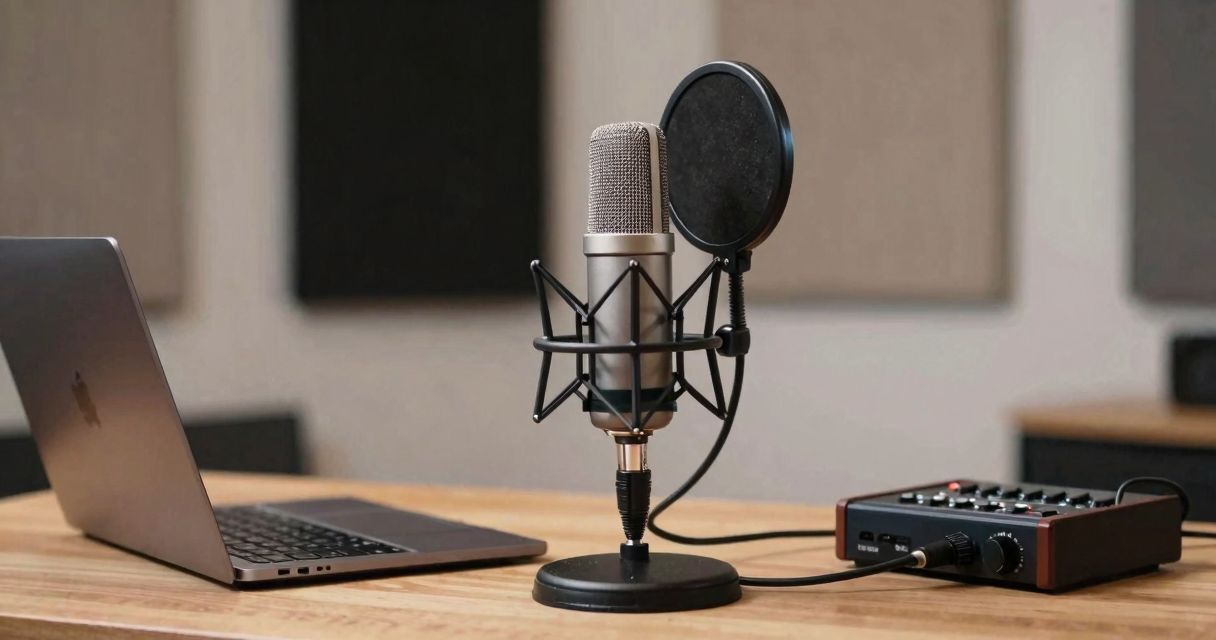
- Stable articulated arm to free up the desk and fix the angle.
- Shock mount to cut mechanical vibrations.
- Pop filter and windscreen to control plosives and breath.
- Light panels or thick curtains in the background: real noise reduction perceived.
- Closed-back headphones to judge sibilance.
- Clean audio interface if you go with XLR (TC20).
- Cable management: keep power and USB separated to avoid interference.
Common problems and quick fixes
The same traps recur often in home studios. A few quick moves save hours of retakes.
- Background noise: lower the gain, move closer to the mic, treat the room, isolate the PC from the desk.
- Plosives: angle the mic away, tighten the pop filter, work on articulation.
- Sibilance: tilt the mic slightly toward the torso, moderate de-esser, avoid aggressive equalization.
- Latency: shorter buffer, up-to-date driver, direct monitoring when possible.
- Room resonances: cover empty corners, multiply diffuse surfaces (books, textiles).
Need to refine your choice of vocal mic according to your timbre? Check our selection of microphones for voice, useful for gauging sound signatures.
Fast recording workflow for a pro sound
My template for a 30‑minute episode with a Tonor Q9 or TC20:
- Check the room: curtains closed, air conditioning and PC quiet.
- Placement: 15 cm, off-axis, input level at –12 dB peak.
- 20-second test take: listen for the sibilance and the low-mids.
- Record continuously, mark the bloopers.
- Light cleanup: high-pass, gentle EQ, gentle compression, subtle de-esser.
- Final check with headphones and on small monitors.
The goal is to achieve a balanced timbre right from capture. Plugins polish, they don’t save a noisy room.
What to realistically expect, honestly, from a Tonor mic in the studio
With a minimum of method, Tonor mics deliver a clear, present voice without harshness. You’re not chasing the magic of a high-end large-diaphragm mic, but a reliable base to shape. For narration, podcasts and regular streaming, it’s a solid companion. Limitations: less texture, less headroom for very dynamic ranges. For produced singing, switch to XLR (TC20) and treat the room.
Editor’s note: your next step to capture a “pro” sound
If you want a clean result without a heavy setup, Tonor remains a relevant entry point. Q9 for effective USB, TC20 to upgrade, TC30/TC777 for daily use. Invest in acoustics, refine the method, and your listeners will hear the difference. Keep this thread: controlled proximity, a careful sound capture, and a simple chain that respects the voice.
Want to dive into questions of directivity, placement and capsule choice? The guide linked above will save you hours of trials. And if you’re still unsure between several signatures, a look at our selection of voice microphones will help you decide without overpaying.
You are looking for a Tonor mic for studio that delivers a clear result without blowing the budget. The right mic/method pairing changes everything: a closer voice, details highlighted, breath under control. This article condenses field experience with the most reliable Tonor models, concrete settings, and a quick comparison against market references to capture a pro sound at home.
Why choose Tonor for a credible home studio
Toner has carved out a nice place among creators who want a clean and predictable recording quality. The strength of the brand: complete kits, quick setup, and a clear vocal signature. Compromises exist — finishes sometimes basic, advanced options limited — but the heart of the matter, voice capture, holds up for podcasts, streams, voice-overs, and a demo track.
- Ready-to-use kits: stand, cable, pop filter, sometimes shock mount.
- Nice midrange response, useful for diction.
- Cardioid directivity on most models to focus the voice.
- No software required for USB: plug in and talk.
That pragmatism is what appeals in a home studio: fewer variables, more time to polish the take.
Tonor models to choose based on your recording context
Tonor Q9 — the USB that puts the voice front and center
The Q9 checks the essential boxes: immediate setup, readable vocal rendering, and included accessories. I used it for remote interviews: mounted on a boom, filter in place, the timbre comes out clean and stable, perfect for regular spoken takes. To remember: angle it slightly to the side to tame plosives and keep a mouth-to-microphone distance of 12–15 cm.
- Ideal: podcasts, online courses, streaming.
- Asset: simple PC settings, zero drivers.
- Limit: fewer upgrade options than an XLR.
Tonor TC20 — the XLR that opens the door to an upgrade
Need room to grow? The TC20 (XLR) pairs with an audio interface to gain control, headroom, and processing. In the studio, it provides a solid base for shaping the voice: a light high-pass filter, a touch of soft compression, a hint of equalization, and the take becomes broadcast-ready. Plan for a sturdy boom arm and a treated space to do it justice.
- Ideal: voice-over, narration, and demo vocal.
- Asset: true evolving audio chain.
- Limit: higher overall budget (interface, cables).
Tonor TC30 — compact, clean and discreet
This small USB mic shines for video and streaming: minimalist footprint, quick setup, clear output in a suitable room. I use it as a supplement for secondary voices: 20° angle from the mouth, modest gain, and you get a clean timbre that blends well in the mix.
- Ideal: quick content, remote work, backup voice.
- Asset: ultra-light plug-and-play format.
- Limit: sensitivity to the room acoustics.
Tonor TC777 — a hassle-free first step
For a quick start, the TC777 proves useful. Think “recording discipline”: keep a sound-treated room, speak slightly off-axis, check your gain staging before recording. When used well, it sounds better than its price would suggest.
- Ideal: beginnings in podcast/stream, professional calls.
- Asset: affordable cost, included accessories.
- Limit: less headroom and finesse than Q9/TC20.
The recording method that works… regardless of the room
Tonor mics hold up well if the method is followed. Here is the roadmap I apply in a light studio.
- Positioning: aim for 12–15 cm, capsule slightly below the mouth, angle 15–30° to calm the “P/B” plosives.
- Acoustics: curtains, filled shelves, rug on the floor; a few panels or blankets behind the mic. This is your basic acoustic treatment.
- Directivity: use the cardioid and the rejection axis. To go further, reread our guide on the microphone directivity.
- Breaths: back off by a centimeter on stressed passages, keep the mouth hydrated.
- Listening: prefer latency-free monitoring (audio interface for XLR, or discreet return for USB).
Useful settings and a typical chain for a studio sound
On USB, set an input level around –12 to –9 dB peak in your DAW. On XLR, start with moderate gain and adapt to the voice. Here is a simple, effective blueprint with Tonor TC20/Q9:
- Soft high-pass filter around 70–90 Hz to clean up rumble.
- EQ: touch of presence between 3–5 kHz if diction lacks bite.
- Soft compression: ratio 2:1 to 3:1, medium attack, natural release, 2–4 dB reduction.
- De-esser: target 6–8 kHz if the “S”s hiss.
- Subtle gate: just enough to cut noise between phrases without “pumping”.
Keep an ear on breathing and timbre consistency. The best plugin remains a good recording.
Tonor versus market references: at-a-glance overview
Compared with the segment’s stars, Tonor keeps it simple and offers strong value for money. A real-world readout.
| Model | Connection | Directivity | Intended use | Editorial note |
|---|---|---|---|---|
| Tonor Q9 | USB | Cardioid | Podcast/quick stream | Clear voice, quick setup, useful accessories. |
| Tonor TC20 | XLR | Cardioid | Voice-over/demo vocal | Solid base for an evolving audio chain. |
| Tonor TC30 | USB | Cardioid | Mobile creation/visual | Compact, clean if the acoustics follow. |
| Blue Yeti | USB | Multi-pattern | Lightweight studio versatility | Useful modes, larger footprint. |
| Audio-Technica AT2020 USB+ | USB | Cardioid | Voice-over, polished podcast | Its own sound, higher price. |
Technical data sheets vary by version. Check compatibility and included accessories before purchase.
Accessories that make a difference in a home studio
A decent mic performs best when the ecosystem supports it. Tonor’s accessory bundle helps, but fine-tune your setup to gain a notch of pro cleanliness.
- Stable articulated arm to free up the desk and fix the angle.
- Shock mount to cut mechanical vibrations.
- Pop filter and windscreen to control plosives and breath.
- Light panels or thick curtains in the background: real noise reduction perceived.
- Closed-back headphones to judge sibilance.
- Clean audio interface if you go with XLR (TC20).
- Cable management: keep power and USB separated to avoid interference.
Common problems and quick fixes
The same traps recur often in home studios. A few quick moves save hours of retakes.
- Background noise: lower the gain, move closer to the mic, treat the room, isolate the PC from the desk.
- Plosives: angle the mic away, tighten the pop filter, work on articulation.
- Sibilance: tilt the mic slightly toward the torso, moderate de-esser, avoid aggressive equalization.
- Latency: shorter buffer, up-to-date driver, direct monitoring when possible.
- Room resonances: cover empty corners, multiply diffuse surfaces (books, textiles).
Need to refine your choice of vocal mic according to your timbre? Check our selection of microphones for voice, useful for gauging sound signatures.
Fast recording workflow for a pro sound
My template for a 30‑minute episode with a Tonor Q9 or TC20:
- Check the room: curtains closed, air conditioning and PC quiet.
- Placement: 15 cm, off-axis, input level at –12 dB peak.
- 20-second test take: listen for the sibilance and the low-mids.
- Record continuously, mark the bloopers.
- Light cleanup: high-pass, gentle EQ, gentle compression, subtle de-esser.
- Final check with headphones and on small monitors.
The goal is to achieve a balanced timbre right from capture. Plugins polish, they don’t save a noisy room.
What to realistically expect, honestly, from a Tonor mic in the studio
With a minimum of method, Tonor mics deliver a clear, present voice without harshness. You’re not chasing the magic of a high-end large-diaphragm mic, but a reliable base to shape. For narration, podcasts and regular streaming, it’s a solid companion. Limitations: less texture, less headroom for very dynamic ranges. For produced singing, switch to XLR (TC20) and treat the room.
Editor’s note: your next step to capture a “pro” sound
If you want a clean result without a heavy setup, Tonor remains a relevant entry point. Q9 for effective USB, TC20 to upgrade, TC30/TC777 for daily use. Invest in acoustics, refine the method, and your listeners will hear the difference. Keep this thread: controlled proximity, a careful sound capture, and a simple chain that respects the voice.
Want to dive into questions of directivity, placement and capsule choice? The guide linked above will save you hours of trials. And if you’re still unsure between several signatures, a look at our selection of voice microphones will help you decide without overpaying.